Release Over 20 Mobile Application Support
Please refer to categories below regarding support of our Mobile application.
Why Change to a Mobile App? Since our founding in 2020, our platform has grown steadily and gained many users who routinely enter many fish into our database. Our database technology has evolved twice through 2025 in order to address barriers to participating – yet several barriers have continued to exist. Beginning in 2026, we are shifting to a primarily mobile app-based platform which we believe addresses all the current issues and makes entering fish a breeze!
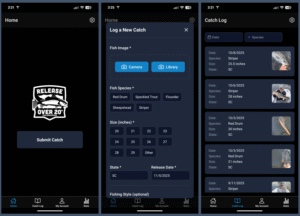
Quick Start Guide
Quick Start Video
Please give our Quick Start Video a watch, which should answer most of your questions.
Quick Start Guide
First Time Setup – When you first sign in, you’ll go through a short 6-step onboarding, including:
- Enter your name
- Add your mailing address (optional – used for mailing free decals or giveaway packages. You can add your address at any time by editing your profile)
- Choose which decals you would like to receive by default. Please note, we only include our +1 decals for every fish you enter. If you choose the OG or QR decals, we will send one of each per month.
- Accept the Terms and Conditions
Logging a Catch – From the Home tab, tap “Submit Catch” and fill out:
- Fish Photo (You can take a photo from the app, or load from your photos)
- Species and Size (Long-press a size to reveal 1/2″ increments)
- State where Released
- Release Date
- Fishing style (Optional)
- Notes (Optional)
Sticky Fields (Time Saver) – If you’re logging multiple catches in a row, the app remembers your last State, Guest Name (for Guides), and Org Credits selections. This makes logging your multiple catches much faster – just update the photo, species and size.
For Guides
If you’re a fishing guide and want to log catches on behalf of your guests:
- Go to the Settings tab
- Tap Enable Guide Mode
- Before logging guest catches, to go My Account and enter your Charter Company Name and Business Email (Optional)
- Now when you submit a catch, you’ll see a “Guest Name” field to enter your guest or guide party information.
Submitting Issues
Found a bug or have feedback?
- Please send us an email at support@releaseover20.org
FAQs
- Where is my entry history from 2020 through 2025? Prior entry data has not gone away – it exists in a separate database. We are focused on managing the transition to our mobile app in the short term, and will determine the best way to integrate prior data in our our reporting later in the year. Please be patient and allow us some grace as we manage the transition. But please know that the data has not disappeared!
- Who made this awesome app? The Release Over 20 app was created by RO20 Board member Michael Collier through his company Technical Angler. Please give them a follow on social media at @technicalangler or online at technicalangler.com